








Skip to content

Installation app for our telematicbox Truck

Installation app: Intuitive support for the installation of the TISPLUS telematicbox Truck

August 24, 2021

To facilitate the installation of our telematicbox Truck, we at TIS GmbH have developed our own app, a self-explanatory aid that guides you step-by-step through the installation process.

It takes about five minutes to use and, with intuitive menu navigation, enables installation without prior training.

The application has been field-tested by manufacturers of commercial vehicles, who rate the fast and intuitive process very positively.

The telematicbox Truck

is an accessory developed by TIS GmbH for collecting telematics data in trucks (data on driving and rest times, fuel consumption or position data). The information is forwarded to the TISLOG logistics software and is then available in our Infodesk web portal.

This is how our installation app guides you intuitively through the installation of the telematicbox Truck

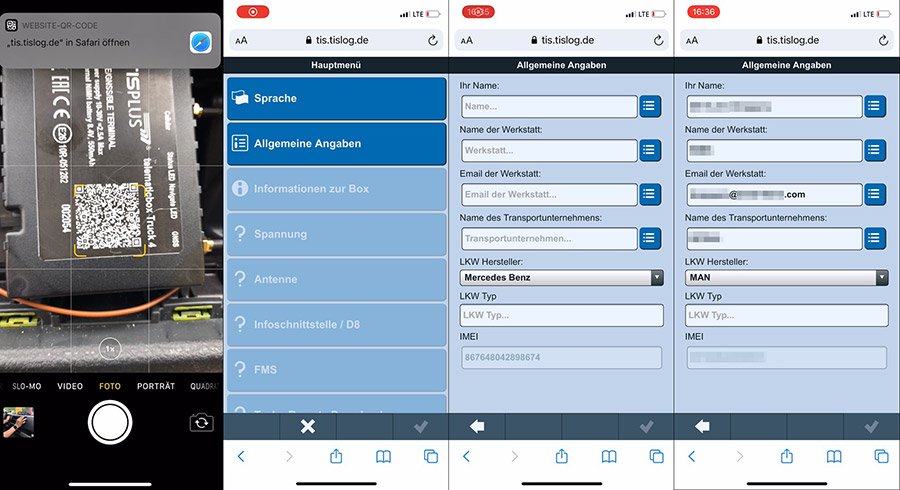
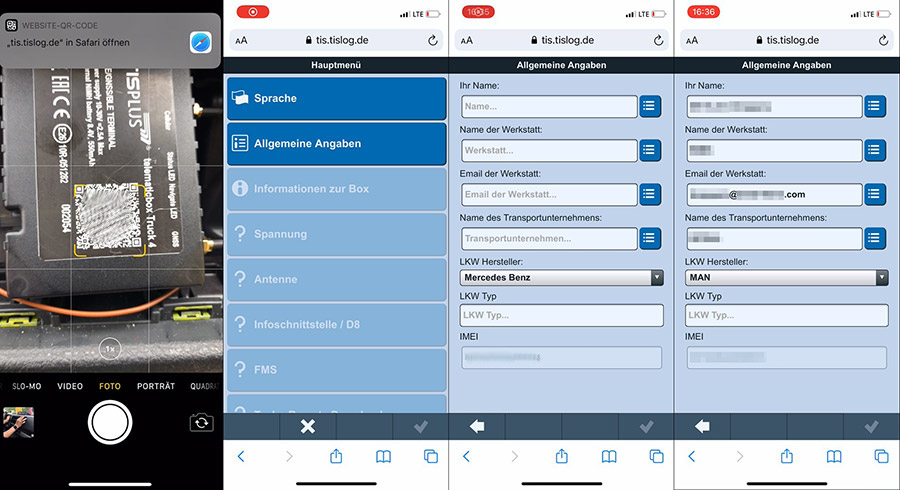
Step 1: Scan QR code
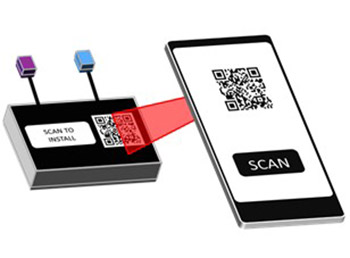
Scan Scan the QR code on the telematicbox Truck and select a language if necessary.

Step 2: Enter data

Fill in the general information, such as name, name of workshop, e-mail address, name of transport company, truck manufacturer and truck type.

Screenshots: Entry of general information
Step 3: The installation can start

You now have the option of viewing information about the device or starting the installation.

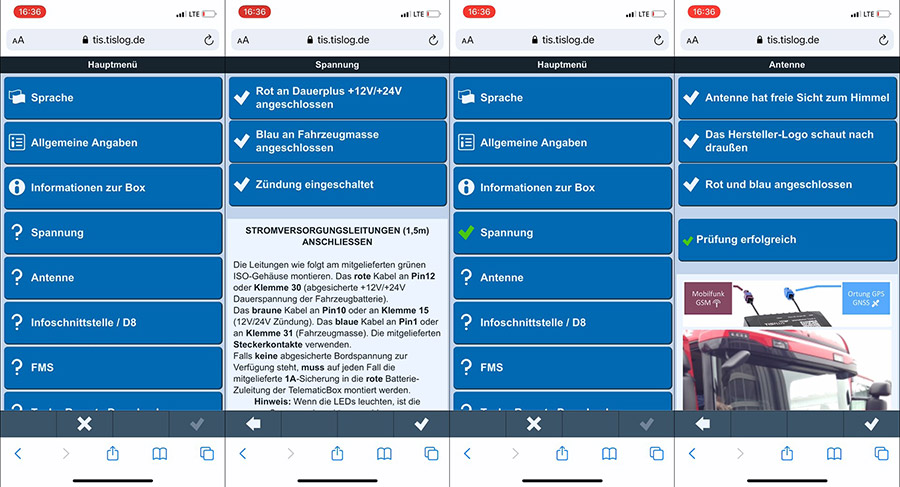
Step 4: Menu item "Voltage"

To start the installation, click on the menu item "Voltage". The app will then show you how to connect the box.
Detailed information texts provide further assistance. Once you have connected everything correctly, you can go back to the main menu, where the Voltage item is marked with a green tick.

Einbau-App der TIS GmbH | telematicbox Truck

Screenshots: Editing dialog menu item "Voltage"
Step 5: Menu item "Antenna"

The next menu item "Antenna" guides you through the corresponding instructions. The procedure here is analogous to the "Voltage" item.

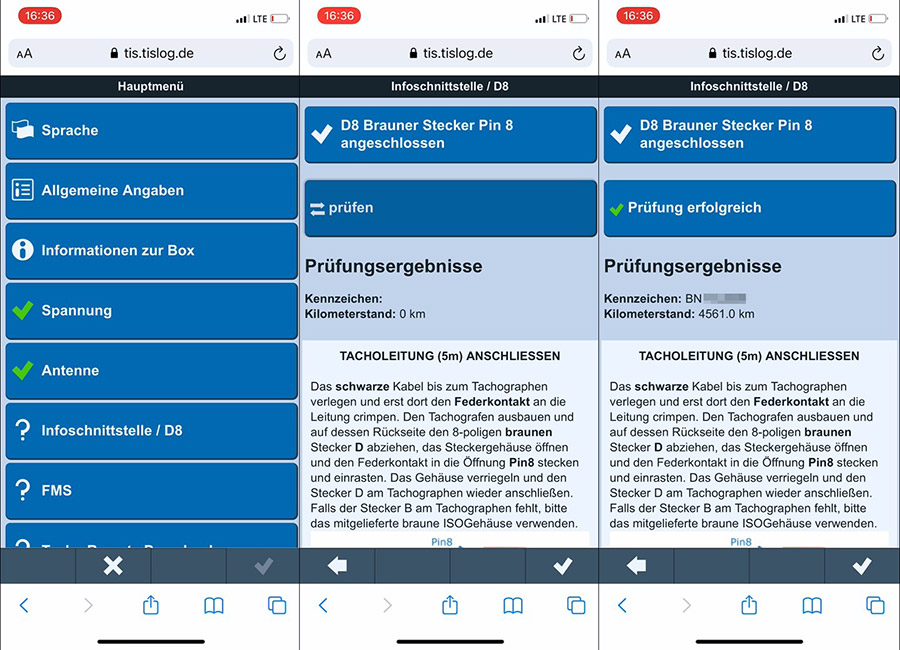
Step 6: Menu item "Info interface / D8"

Under the following menu item "Info interface / D8" you can check if the telematicbox receives data from the info interface with the ignition switched on. You will get a check result, which also shows the license plate of the vehicle.

Einbau-App der TIS GmbH | telematicbox Truck

Screenshots: Editing dialog menu item "Info interface / D8"
Step 7: Menu item "FMS"

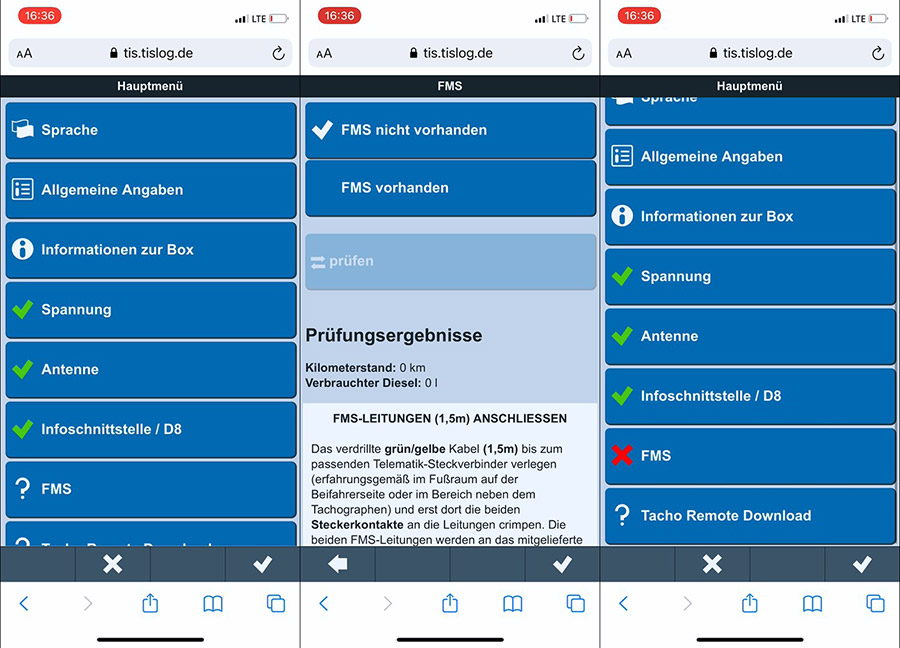
At the menu item "FMS" you can now specify whether you have connected the FMS and check this as well.

Einbau-App der TIS GmbH | telematicbox Truck

Screenshots: Editing dialog menu item "FMS"
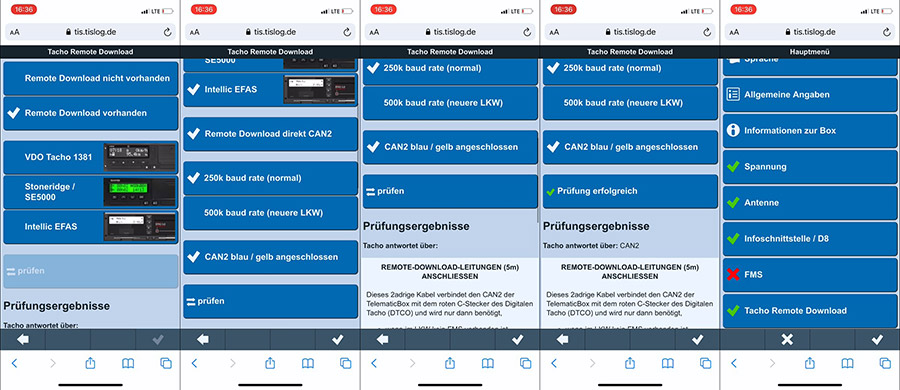
Step 8: Menu item "Tacho Remote Download"

Here you can set-up how the remote download should be performed. Through a subsequent check, the telematicbox Truck confirms that it can communicate with the tacho.

Einbau-App der TIS GmbH | telematicbox Truck

Screenshots: Editing dialog menu item "Tacho Remote Download"
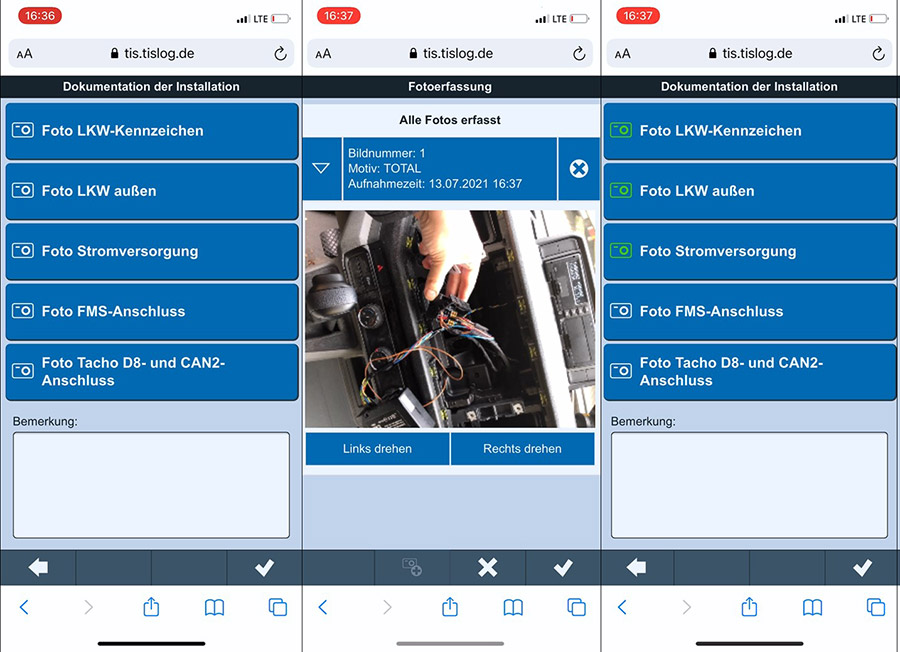
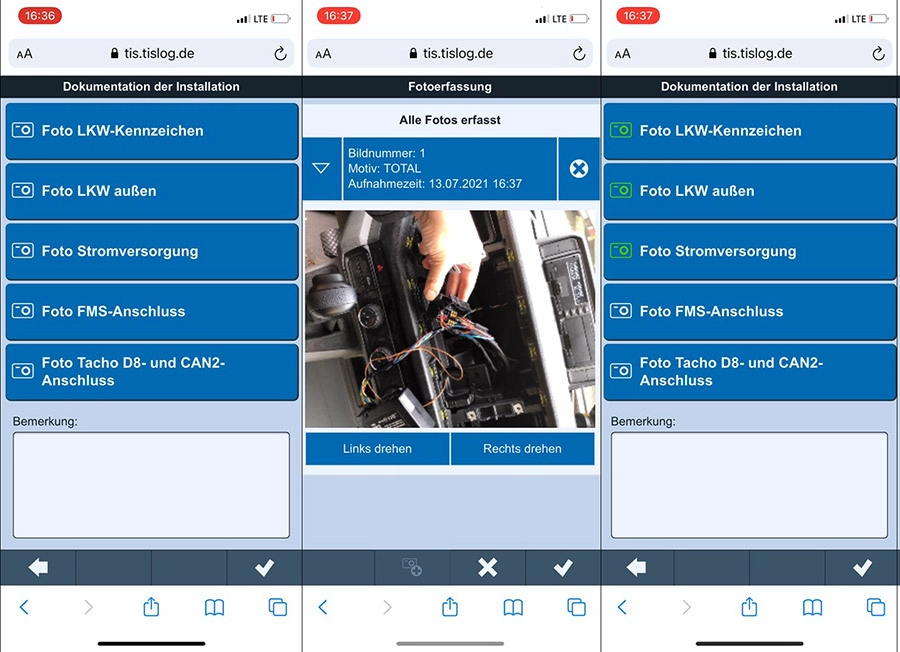
Step 9: Photo documentation

For the remaining points, the installation can be documented, for example, by photos.

Installation app of TIS GmbH | telematicbox Truck

Screenshots: Photo documentation

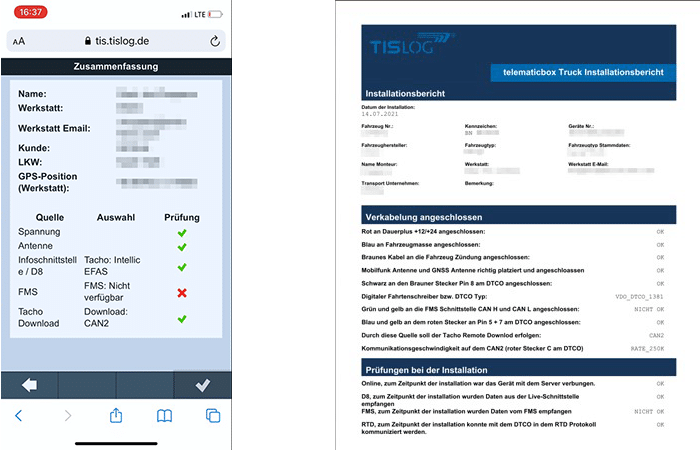
Step 10: PDF report

Finally, you will see a summary of all data entered in the app. With the confirmation of this summary, a report in PDF format will be automatically sent to the email address entered at the beginning.

Einbau-App der TIS GmbH | telematicbox Truck

Screenshot left: Installation summary, Fig. right: PDF report of the installation
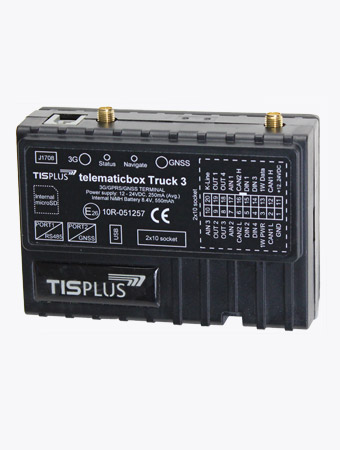
TISPLUS telematicbox Truck 3

The TISPLUS telematicbox Truck 3 is a module of the TISLOG logistics solution and enables the continuous location of the vehicle, the acquisition of data from the digital speedometer and telematics data from the truck board computer via FMS/CAN interface.
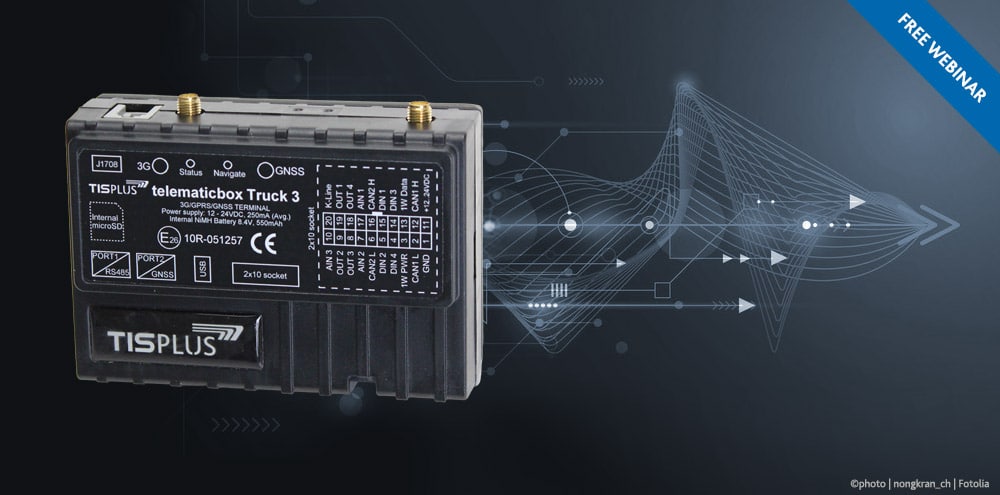
telematicbox Truck | TIS GmbH | Telematics accessories
Free Webinar

Learn more about the telematicbox Truck

Learn all about the benefits of the telematicbox Truck for your business in our free webinar.

Do you have questions about or are you interested in our app, the telematicbox Truck or other TIS products?

Talk to us!

Our sales team will gladly advise you!

Do you have any questions about this news or general questions about our products and services?

Our colleagues in the TIS sales gladly take care of your questions concerns.

Please give us a call:

+49 2871 2722-0

Or send us an e-mail

See you again next time!

That's it from us with news for today!

For comments, requests or suggestions regarding this newsletter please do not hesitate to contact us.

More News

TIS GmbH with current topics at LogiMAT

23 January 2026

TIS GmbH will present its current topics at LogiMAT 2026. You can find us in hall 4 at the booth A03.

READ MORE ...

Logistics & Automation, LogiMAT and discontinuations

21 January 2026

TIS GmbH is an exhibitor at the trade fairs Logistics & Automation and LogiMAT. Furthermore, we want to inform you about two discontinuations.

READ MORE ...

LogiMAT 2026

15 January 2026

TIS GmbH has its own booth at the intralogistics trade fair LogiMAT 2026. The most important topics are fleet management, loading equipment management, cross docking and hardware.

READ MORE ...

Year in review & Merry christmas

17 December 2025

The Year is rapidly drawing to a close. That is why we want to make a review.

READ MORE ...

Logistics & Automation in Bern

12 December 2025

TIS GmbH has its own booth at Logistics & Automation in Bern. Visit us – hall 3, booth D42!

READ MORE ...
Telematik Nachrichten der TIS GmbH aus Bocholt

Newsletter

Do you want to be automatically informed about our events? Subscribe to our newsletter.

Webinars & Training

of TIS GmbH